“Can I make games without coding skills?”
The answer is: YES! And it only takes a week!
Recently, developer @chongdashu built 4 complete 3D games in just one week: an endless runner, a tower defense game, a Mario Party-style minigame, and a full 3D arena shooter. The magic? He used “Vibe Coding” — you simply describe your ideas in natural language, and AI writes the code, generates assets, and handles debugging for you!
Today, I’ll walk you through this revolutionary approach to game development, step by step.
📱 See It in Action: All Made by AI!

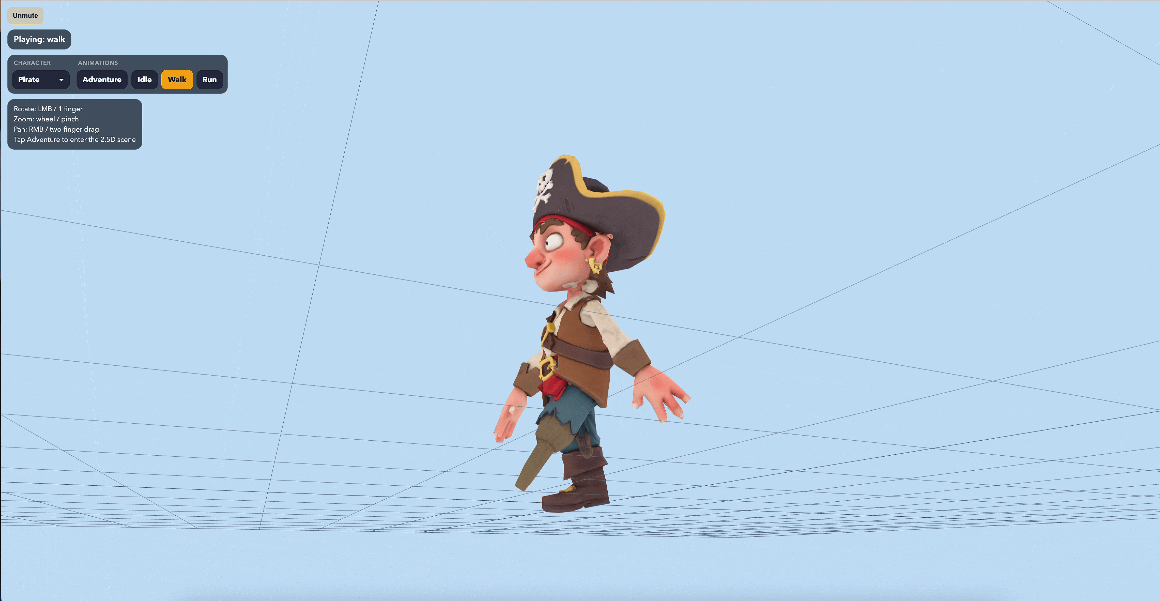
This is a fully AI-generated 3D point-and-click adventure game featuring:
- ✅ Complete 3D character models (with skeletal animations)
- ✅ Beautiful 2.5D background scenes
- ✅ Background music and full voice acting
- ✅ Built-in level editor
- ✅ iOS and Android mobile support
The key point: The developer didn’t write a single line of code by hand — everything was “chatted” into existence with AI tools!
🤔 What is Vibe Coding?
Vibe Coding is a revolutionary development approach coined by AI researcher Andrej Karpathy. The core concept:
Describe ideas, not code → AI implements → Test and feedback → Iterate → Done
Traditional development:
Learn programming → Write code → Debug → Modify code → Debug again... (months)
Vibe Coding approach:
Describe idea → AI generates code → Play and test → Tell AI improvements → Done! (days)
It’s as simple as chatting with a super-programmer!
🛠️ Your Toolkit: What You Need
1️⃣ AI Coding Assistants (Choose One)
| Tool | Strengths | Best For |
|---|---|---|
| Claude Code | Strong code comprehension, complex projects | Quality-focused developers |
| Codex CLI | High autonomy, long independent work sessions | Projects requiring extensive iteration |
| Cursor | User-friendly interface, high integration | Beginners |
💡 Recommended Combo: Claude Code (primary) + Codex CLI (auxiliary)
2️⃣ AI Models (Choose Based on Needs)
- GPT-5.2/5.3/5.4: Excellent at planning and architecture
- Claude Opus 4.5/4.6: High code quality, strong comprehension
- Gemini 3 Flash: Rapid prototyping
3️⃣ Game Engines
- ThreeJS: 3D web games, cross-platform
- PhaserJS: 2D games, simple and easy
4️⃣ Supporting Tools
- Nano Banana Pro: AI-generated concept art
- Meshy: Image-to-3D models (with rigging and animation)
- Playwright: Automated testing
🎯 Hands-On Tutorial: Build Your First 3D Game in 7 Steps
Step 1: Set Up Agent Skills
Agent Skills are like installing “professional skill packs” for AI, teaching it game development.
How to do it:
- Download the ThreeJS Builder Skill
- Copy to your project folder:.claude/skills/threejs-builder/ or .codex/skills/threejs-builder/
- Verify the skill is loaded:In Claude Code: "What skills do you have?" In Codex CLI: "skills"
What’s included in this skill pack?
- Scene setup and rendering pipeline
- GLTF/GLB model loading
- Animation blending system
- Shaders and post-processing effects
- Game state machine and parallax effects
Step 2: Acquire Game Assets
Important tip: Don’t let AI generate assets from scratch!
Why?
- ❌ AI-generated assets have inconsistent styles
- ❌ Missing animations and textures
- ❌ Format compatibility issues
The right approach: Use existing asset packs
Recommended asset websites:
- Quaternius (Free CC0 license)
- Cube World: Cartoon-style 3D assets
- Toon Shooter Kit: Shooter game asset pack
- URL: quaternius.com
- itch.io
- Tons of indie developer assets
- Always check the license
How to do it:
1. Download asset pack (ZIP format)
2. Extract to project folder:
public/assets/cubeworld/
3. Create asset index JSON file
Asset index example:
{
"pirate": {
"model": "pirate_skeleton.glb",
"animations": {
"idle": { "clip": "Idle", "duration": 2.0, "loop": true },
"walk": { "clip": "Walk", "duration": 1.0, "loop": true },
"run": { "clip": "Run", "duration": 0.8, "loop": true }
}
}
}
Step 3: Generate 3D Characters (Optional)
If you want unique characters, use AI to generate them:
Tool chain: Gemini → Nano Banana Pro → Meshy
3.1 Generate Concept Art with Gemini
Prompt template:
Following Nano Banana Pro's prompt guidelines,
generate a cartoon-style pirate character with:
- T-pose stance (arms extended horizontally)
- Front and back views
- Style: whimsical
- Suitable for 3D model conversion
Key tips:
- ✅ Let Gemini learn Nano Banana Pro’s prompt guide first
- ✅ Enable “thinking mode” for better results
- ✅ Ensure character faces forward (easier for 3D conversion)
3.2 Convert to 3D Model with Meshy
- Visit meshy.ai
- Select “Image to 3D”
- Upload front and back images
- Choose T-pose stance
- Wait 2-3 minutes for generation
Output:
- Textured 3D model (GLB format)
- Automatic rigging
- Basic animations (walk, run, idle)
Step 4: Build Game Scene with AI
Now the real Vibe Coding begins!
Prompt Example 1: Create Basic Scene
Create a 3D game scene using ThreeJS:
1. Load all models from public/assets/cubeworld/
2. Create a 20x20 ground grid
3. Add skybox and ambient lighting
4. Set up orbit camera controls
5. Implement in a single HTML file using Vite dev server
Requirements:
- Use ThreeJS r150+
- Support touch controls (mobile)
- 60 FPS performance
AI will automatically:
- Create complete project structure
- Write HTML, CSS, JavaScript
- Configure Vite build tool
- Implement camera controls and interactions
Prompt Example 2: Add Character Control
Add character control to the existing scene:
1. Load pirate character model
2. Implement WASD keyboard controls
3. Switch animations based on movement speed (idle/walk/run)
4. Camera follows character
5. Add collision detection
Reference animation definitions in assets_index.json
Prompt Example 3: Add Game Mechanics
Implement a simple collection game:
1. Randomly spawn 10 treasure chests in the scene
2. Show prompt when character approaches chest
3. Press E to collect chest
4. Display collection progress UI (top-right corner)
5. Show victory screen when all chests collected
Use state machine to manage game states
Step 5: Test and Iterate
The core of Vibe Coding: Play and improve!
Testing workflow:
- Start local servernpm run dev
- Play the game in browser
- Test all features
- Record bugs and improvements
- Tell AI the issuesFound the following issues: 1. Character movement too slow 2. Camera angle too close 3. Chest collision range too small 4. Missing background music Please fix these issues one by one
- AI automatically fixes and tests
Advanced tip: Use Playwright for automated testing
Create automated test script:
1. Test if character can move normally
2. Test if all animations play correctly
3. Test chest collection logic
4. Screenshot comparison for visual effects
Step 6: Add Sound Effects and Voice Acting
Prompt example:
Add audio to the game:
1. Background music:
- Loop light adventure music
- Volume 30%
- Support mute toggle
2. Sound effects:
- Footsteps (vary with movement speed)
- Chest opening sound
- Item collection sound
3. Character voice acting:
- Use ElevenLabs API
- Character: Humorous pirate
- Lines: Opening, collecting chests, victory
Implement audio manager with volume controls
Free sound effect resources:
- Freesound.org
- OpenGameArt.org
- Pixabay Music
Step 7: Deploy to Mobile Devices
Package as native app using Capacitor
Prompt:
Package the game as iOS app using Capacitor:
1. Install Capacitor dependencies
2. Configure capacitor.config.json
3. Add iOS platform
4. Optimize touch controls:
- Single finger to rotate camera
- Two fingers to zoom
- Virtual joystick for character control
5. Sync and build iOS project
Ensure smooth performance on iPhone (60 FPS)
Deploy to web:
npm run build
# Deploy to Vercel/Netlify/GitHub Pages
🎨 Advanced Techniques: Make Your Game Professional
1. Use PRD (Product Requirements Document)
Don’t ask AI to write code directly — plan first:
Create a PRD for a tower defense game:
Core gameplay:
- Enemies walk from entrance to exit
- Player places defense towers to stop enemies
- Defeat enemies to earn coins
- Use coins to upgrade towers
Tech stack:
- ThreeJS + PhaserJS
- State management: Zustand
- Physics engine: Not needed
Level design:
- 3 levels with increasing difficulty
- 5 enemy types
- 4 tower types
Generate complete PRD and Technical Design Document (TDD)
2. Use TDD (Technical Design Document)
Based on the PRD above, generate TDD:
1. Project structure
2. Core classes and interfaces
3. Data flow design
4. Performance optimization strategy
5. Testing plan
Output in Markdown format
3. Implement Step by Step
Following the TDD, implement step by step:
Step 1: Implement map and pathfinding system
- Create grid map
- Implement A* pathfinding algorithm
- Visualize paths
Wait for my confirmation before continuing
💡 Useful Prompt Templates
Debugging Prompt
The game shows the following error:
[Paste error message]
Current code:
[Paste relevant code]
Please analyze the cause and fix it
Optimization Prompt
The game only runs at 30 FPS on mobile devices
Please optimize performance:
1. Reduce draw calls
2. Use object pooling
3. Optimize shadows and lighting
4. LOD (Level of Detail) management
Target: 60 FPS on iPhone 12
Feature Addition Prompt
Add multiplayer functionality to the existing game:
1. Use WebSocket for real-time sync
2. Display other players' positions and animations
3. Implement simple chat system
4. Handle network latency and reconnection
Backend using Node.js + Socket.io
📊 Real Case Study: 4 Games in One Week
Developer: @chongdashu
| Game Type | Dev Time | Main Tech | Highlights |
|---|---|---|---|
| Endless Runner | 1.5 days | ThreeJS | Procedural level generation |
| Tower Defense | 2 days | ThreeJS + AI enemies | Smart pathfinding system |
| Mario Party | 1 day | ThreeJS | Local multiplayer |
| Arena Shooter | 2.5 days | ThreeJS + Physics | Complete weapon system |
Total investment:
- Time: 7 days
- Cost: ~$20 (AI API calls)
- Lines of code: 0 hand-written, 15,000+ AI-generated
Key success factors:
- ✅ Use high-quality Agent Skills
- ✅ Choose appropriate existing assets
- ✅ Clear requirement descriptions
- ✅ Rapid iteration and testing
- ✅ Leverage strengths of multiple AI models
🚀 Start Your Game Development Journey Now
Beginner Roadmap
Week 1: Familiarize with tools
- Install Claude Code or Cursor
- Learn basic prompting techniques
- Follow tutorial to create a simple 3D scene
Week 2: Make your first game
- Choose simple game type (e.g., collection game)
- Use existing asset packs
- Complete basic gameplay
Week 3: Add advanced features
- Sound effects and music
- UI interface
- Level system
Week 4: Publish and share
- Deploy to web
- Package as mobile app
- Share on social media
Recommended Learning Resources
- YouTube Channel
- Chong-U — AI Oriented Dev
- 18K+ subscribers, 84 tutorial videos
- GitHub Projects
- threejs-capacitor-ios-game
- phaserjs-oakwoods
- threejs-toonshooter
- Online Courses
- BuilderPack.ai (paid, includes complete workflow)
- Insiders Club (free resources)
- Communities
- Reddit: r/ClaudeCode, r/vibecoding
- Discord: AI Builders Community
⚠️ Common Issues and Solutions
Q1: What if AI-generated code has bugs?
A: This is normal! Solution:
1. Copy the error message
2. Tell AI: "Got this error: [error message], please fix"
3. If it fails multiple times, try a different AI model
4. Break the problem into smaller steps
Q2: How to optimize poor game performance?
A: Use performance analysis prompt:
Analyze game performance bottlenecks:
1. Use Chrome DevTools performance profiler
2. Identify high-cost functions
3. Provide optimization suggestions
4. Implement optimizations and compare results
Q3: How to maintain code quality?
A: Use code review prompt:
Review current code:
1. Check code structure and organization
2. Identify duplicate code
3. Suggest refactoring approaches
4. Add necessary comments
5. Ensure best practices compliance
Q4: How to coordinate multiple AI tools?
A: Recommended combination:
- GPT-5.2: Planning and architecture design
- Claude Opus 4.6: Core code implementation
- Nano Banana Pro: Asset generation
- Playwright: Automated testing
Q5: Do I need to learn programming?
A:
- No coding experience: Can make simple games (collection, runner)
- Basic understanding: Can make moderately complex games (tower defense, shooter)
- Programming experience: Can make complex games and optimize performance
Suggestion: Learn while building — AI will teach you many programming concepts!
🎯 Summary: Advantages and Limitations of Vibe Coding
✅ Advantages
- Very low barrier: No deep programming background needed
- Rapid prototyping: Validate game ideas in days
- Learning tool: AI explains code logic
- Lower costs: Indie developers can make 3D games
- Fast iteration: Modify ideas by simply re-describing
⚠️ Limitations
- Complex logic: AI may misunderstand, requiring multiple iterations
- Performance optimization: Advanced optimization still needs manual intervention
- Creative constraints: AI better at common game types
- Network dependency: Requires stable API access
- Cost accumulation: API fees for large projects can add up
Best Practices
- ✅ Start with small projects
- ✅ Use existing assets
- ✅ Keep requirements clear
- ✅ Test frequently with feedback
- ✅ Leverage multiple AI tools
- ✅ Record successful prompts
- ✅ Join developer communities
🌟 Conclusion
Vibe Coding isn’t magic, but it truly lowers the barrier to game development.
You don’t need to be a programming master or learn complex game engines. As long as you have creativity, patience, and can “chat,” you can make your own games.
Start now!
Pick a simple game idea, open Claude Code or Cursor, and type your first prompt:
I want to make a simple 3D collection game,
where the player controls a character to collect gems in a scene,
implemented with ThreeJS.
Please help me plan the project structure and development steps.
Then, watch the magic happen! ✨
📚 Related Resources
- @chongdashu YouTube Channel: AI Oriented Dev
- GitHub Project Collection: github.com/chongdashu
- BuilderPack.ai: Complete workflow and asset packs
- Quaternius Free Assets: quaternius.com
- Meshy 3D Generation: meshy.ai
- ThreeJS Official Docs: threejs.org
💬 Are you ready to make games with AI?
Tell me in the comments:
- What type of game do you want to make?
- What’s your biggest challenge?
- What other AI development techniques would you like to learn?
Follow me for more AI development tutorials! 🚀